


Power Efficiency - why we care so much about it
Challenges of a battery-powered device
Empowering your TRMNL to run for months between charges is a defining part of the user experience; managing cables, frequent charging and dead devices turn power management into another chore that steals your focus.
A general hardware rule: more efficient components are more expensive and more complex.
Below is an overview of the difficult decisions we've made on both the hardware and software side to leverage complexity and make TRMNL a maintenance-free device.
The Components
Let's begin with the anatomy of a TRMNL OG device.
- ESP32-C3: This version of the ESP32 is less powerful and has less memory than other models, but is the lowest power version with WiFi support. The tradeoff is that software becomes more complex to work around the constraints of the MicroController Unit [MCU]. Other WiFi enabled MCUs use less power but also have a higher price-per-unit and software complexity.
- Lithium Battery: There are other battery chemistries, but this type of battery can handle the high current demands of the ESP32 and can be recharged hundreds of times.
- Voltage Regulator: The battery is rated 3.7-4.2V while the ESP32 and display require 3.3V. This necessitates adding a circuit to regulate the battery voltage to the MCU voltage. The inexpensive component choice would be a "linear regulator" which throws away the excess energy as heat. TRMNL chose to use a "switching regulator" which utilizes up to 20% more of the battery energy, but at a higher component cost and circuit complexity.
- 7.5" e-Paper display: This type of display retains its image without power and is readable in direct sunlight. The display is a large portion of the total component cost, but is also what makes TRMNL a unique product.
TRMNL's component choices can last multiple months on a single charge for our battery-powered digital device. The choices above dictate how much work (software) can be done on the device versus how much work must be done on the server.
TRMNL's balance of device / server effort lets us generate beautiful output using web UI programming, while having the TRMNL device itself receive and display those screens as compressed images (snapshots).
Where does the energy go?
After choosing components and designing a circuit, the biggest challenge to creating energy-efficient battery powered devices is the software.
The general idea for power usage on IoT devices is to get the work done quickly and then put the CPU into 'deep sleep' until needed again. For TRMNL firmware, power optimization is quite a bit more complex because we use WiFi, an energy-hungry task.
When the TRMNL wakes up to update the image, many different tasks must be accomplished. Software profiling tools won't be much help optimizing these tasks. An excellent tool which allows us to see the real-time power usage is the Power Profiler Kit II from Nordic Semi. This is a surprisingly affordable tool with very high precision. We can use the PPKII as a virtual battery for the TRMNL to see exactly how much energy is being used.
The image below is a screen capture from the PPKII software showing the current drawn from the battery during an image update:
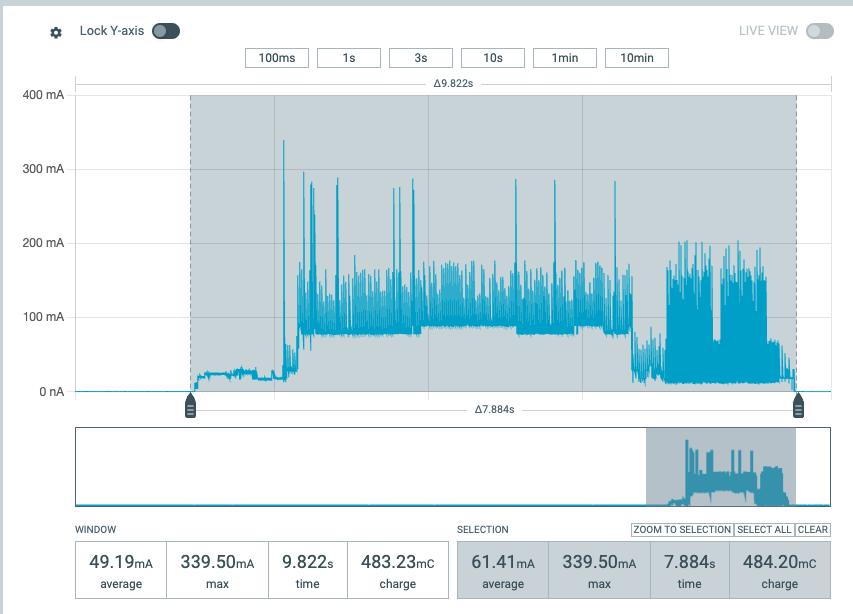
After the initial peak of starting up the CPU, the next set of large peaks are caused by the WiFi usage. It's pretty clear that using WiFi communications is the most energy intensive task of the TRMNL. Here are the four tasks which use WiFi:
- Connect to AP: Connecting to your local access point can take more than a second. That doesn't sound like much, but one second of maximum power drain is significant.
- NTP: The device needs to know the correct time to record events and know the relative age of images. The Network Time Protocol is a standard way of getting the accurate time from servers at Google, NIST or other sources. This can take up to four seconds or more depending on network conditions.
- API server: Our web servers which manage devices and playlists. This informs the device of firmware updates, users' settings (e.g. refresh time), and image links. The device also tells the web server its battery level for user-facing alerts and notifications. This communication usually takes about one and a half seconds.
- AWS image cache: We cache plugin images on AWS to reduce latency and provide a broader global reach. We also compress images to make sure the payloads are small. Pending image size, this step can take one to five seconds.
Each step above uses significant power. They also take much longer than when done on more powerful PCs.
For example, a modest Linux machine like the Raspberry Pi Zero can accomplish each of those tasks in a fraction of a second because the CPU and network hardware trade time for higher power consumption. With the ESP32 family, one of the tradeoffs is that network tasks take a long time.
Software Optimization
This topic is quite broad, but the tl;dr is that there are thousands of different ways to write code which accomplishes a certain task, but not all are efficient. Put simply: If we didn't put the TRMNL's ESP32 to sleep between updates, your battery would last less than a day.
There are unpleasant consequences to using the ESP32's deep sleep mode. When the ESP32 is in its lowest power sleep mode, it turns off the power to the main memory. This complicates the software because the system essentially starts from a blank slate each time it wakes up.
So besides the obvious power optimizations like deep sleep, what are some other opportunities?
WiFi Connection
The WiFi connection to an access point can take more than a second; this is due to DHCP negotiation. This is where the access point assigns an IP address to your device. The deep sleep trade-off creates this renegotiation. We recently added support for fixed IP addresses. With a fixed IP your TRMNL can connect to your AP in a fraction of a second.
NTP Server
We recently made a change to the firmware which greatly reduces the time spent getting the time from NTP. The new logic only connects to the NTP server if the ESP32's internal (slightly imprecise) clock doesn't have a valid time or if it's been more than 24 hours since the last NTP fetch. This saves significant power since this step can take up to four seconds.
AWS Image Download
Another recent change to the firmware addressed image downloads. Each image name contains a unique identifier for the plugin/mashup that generated it, as well as a timestamp.
For images which don't change at every update (e.g. "Days Left Until..." plugins) we can compare the name and see if we recently downloaded the same image. If our local copy of the image (in FLASH storage) is the same as the current one from our playlist, we can skip this step entirely. Images older than 24 hours are automatically purged from local storage in case a user makes changes to their playlist.
Odds & Ends
The remaining device refresh tasks (image decoding and e-paper update) use significant power, but less than the WiFi tasks.
We've optimized this code to use as little power as possible; for example - putting the ESP32 into 'light' sleep while waiting for the e-paper to update. We need to wait for the update to complete to tell the display itself to sleep before the ESP32 can go into deep sleep. If we were to leave the e-paper display in idle/wake mode after the update, it would shorten the TRMNL battery life significantly.
Under your control
TRMNL's hardware and firmware provide a platform for personal, non-intrusive information.
By optimizing the platform we give you more freedom in how you use it. As described above, each update needs a certain amount of energy. Therefore it follows that more frequent updates will drain the battery faster. So we've even optimized the display updates themselves to be less visually disturbing (flicker-free).
Beyond the refresh rate and update type, the energy/time spent per update is highly variable as well. Local network conditions affect every step, but so do image choices. Smaller image files download and decode faster than larger images. An image's file size is highly dependent on the graphical content. We use PNG as our standard file format because it performs well on a variety of image content. Images like the weather, with large continuous areas of a solid color, compress quite well while dithered photos compress poorly. 2-bit grayscale images are generally larger than 1-bit bitonal.
For popular plugins, this translates to image sizes which range in size from 2K to 50K bytes. We recently added support for decoding full color images onto black/white displays. Color images can be much larger than black and white. To help manage the local storage and battery life, all images are limited to a maximum size of 90,000 bytes.
The increasing value of your investment in TRMNL
Your TRMNL hardware may not change after purchase, but we're continuously improving its software on both the device and server back-end to ensure your experience is the best it can be.
By making the software more battery-friendly we extend the time between charges, which extends the total life of the battery via fewer charge cycles.
Underscoring all of this is our commitment to open sourcing each of these discoveries. This ensures that not only can you see what's in the software, you're also able to control it.
