


Making a Great Plugin the First Time
Creating a plugin is an exciting way to use our Developer Edition license to bring your low-distraction dashboard to life with the content you want to see. Let's cover a few ways to get started; pick the one that fits you best.
The Copycat
You see a great idea, you aim to take it. Great! The spirit of TRMNL's open source core is to share our value with others, building a community on a foundation of generosity. Hundreds of authors have crafted a plugin, honed it, and published it as a recipe for others to install or fork. Here's a quick way to understand the difference:

- Install: Use the plugin in your account, with customizations designed by the author, and maintain a link between your copy and the original recipe, so that any updates made to the original recipe will automatically be applied to your installation. This is similar to how apps in a mobile app store function.
- Fork: Make a copy of the plugin, but with the ability to see exactly how it was made and have the ability to change anything, including the markup code that lays out the look and functionality of the plugin. The link to the original recipe is severed. This is the copycat way.
And don't think you need to copy a plugin with similar content. You may just love the way the content is laid out and can imagine your data in that same format. Don't like it after forking? Click Remove Plugin and go hunt down another one. Of course, if you'd rather get a robot to help you...
The AI Builder
Oh, you thought you could escape AI's ever-presence in the conversation?
Actually, you can, just scroll-down to the next section.
But... if you are intrigued, then let me introduce to our AI Builder, a collection of tools, prompts, and a dusting of hubris that takes a one-sentence request and $1 or two and turns it into a plugin that makes you go, "wow."
As mentioned in our helpful AI agent guide, once you opt-in to using the tool and get your API key assigned (so OpenRouter can track your usage and charge you), you can start creating a brand new private plugin, save your settings (e.g. name of the plugin), then head into edit markup. Once there, the shiny new Agent tab will be available.

Now, while it is ever evolving, it really shines in its ability to give you a great first draft of a plugin, even if you don't know where your data is coming from or exactly what you want it to look like. Just remember, there's a reason we recommend Claude's AI models; less expensive models can do an good job with additional guidance, but you're building your first plugin, so may be worth leaning on the model to do a lot of the heavy lifting.
If you prefer to keep the human completely in the loop, have you considered some light reading?
The Bookworm
You want some documentation. Pages of clear guidance and examples, because you need to understand it, and you know you're on the looooooong road to being a multi-recipe publishing, thought-leadin', creator fund earning TRMNL Expert.
We built our Framework with two core intentions: Create a design language for reliable and innovative rendering on an ePaper display, and give any developer, even the lapsed ones, superpowers. Like mobile-first design lead frontend developers through the mobile/desktop swap, our framework-first ethos can be interpreted as, "Design with Framework and Liquid first, then fallback to custom CSS and Javascript if you reach a limitation."
So dive into the docs or the examples, consume it all, and get building! Remenber that we also use Liquid and even have custom filters available.
- Framework v2: Added responsive classes for larger displays and higher bit depths (more grays), redesigned our built-in javascript functionality for clamping, and expanded size variations across elements and components.
- Framework v3: Added color through variants, hues, and new utilities, supporting colors beyond black and white.
Of course, maybe you would rather have your docs in more of a just-in-time fashion...
The Maker
You just need a process to get started, and a reference point for how to do the specific thing you want to do right now. You want to get started.
So you jump on our private plugins tutorial, you load the Framework docs in another tab, and you find an open API you can query without any authentication and get to work understanding by doing. Here's a simple set of guidelines to help you get comfortable:
- Set your plugin to polling, save, then force refresh.
- After a few seconds, click edit markup and scroll down to make sure data is populating in My Variables.
- Build in the FULL view; the other views will be derivative of the full view so it's a great place to lock-in before you start migrating. This includes sticking all your Liquid logic (tutorial and advanced tutorial) in the FULL view, for now. In the future, to keep the code DRY [Don't Repeat Yourself], you can move the logic to the Shared tab. All views process Shared content prior to their own.
- Start with a basic template:
<div class="layout">
  <div class="column">
  <!-- Show some data here -->
  </div>
</div>
<div class="title_bar">
  <img class="image" src="/images/plugins/trmnl--render.svg">
  <span class="title">Title Bar with Instance</span>
  <span class="instance">Production</span>
</div>
- If the data source is an array of objects, then make a quick iteration:
{% for thing in yourVariableName %}
  {{ thing.id }}
{% endfor %}- Look over the data provided from your API and take notes about features you need to include, such as Form Field customization (visual editor), highlighting data, and date transformations.
- Make some early layout decisions for the data. Will it be a grid, a list of items, columns (smart columns?), flex... (Framework docs). This can change later, and the easiest way to know it should change is to build something and hate it.
You're building in small pieces, then likely tearing away large chunks. You don't care, because you are learning and having fun.
The Designer
You've lived your life in layers, built elements through drag and drop, and you want that same experience within TRMNL. You want a Visual Editor.
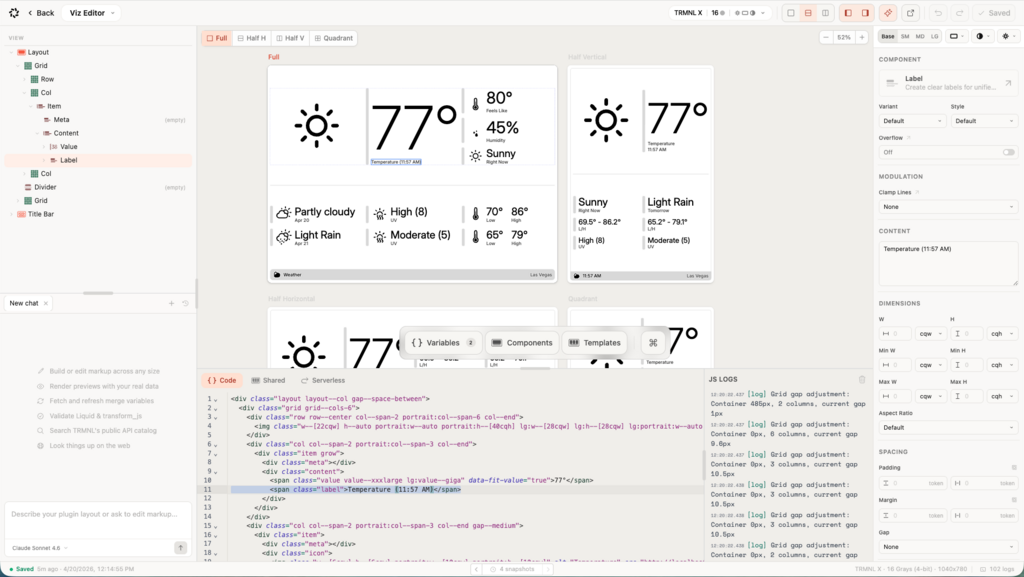
Released in beta in April 2026, our visual editor offers a way to build new plugins or modify existing plugins (hello Copycat) with a design driven view, rather than a programmatic view, while both are available. Using the editor is optional, and the Designer can easily switch back and forth depending on their needs.
Final Thoughts
There is no wrong way to make a plugin... except to use custom css to lay everything out like you're working on your first website in 1998. Ignoring this advice is possible, but will lead to frustrations later. The learning curve is not steep nor is it high, but ignoring it is ignoring an opportunity to learn, which should never be squandered.
